



A website title is the text defined by a page’s HTML <title> tag. It’s what shows up in browser tabs, in search engine results as the clickable headline, and often in social media previews when a page gets shared.
It’s worth clearing up a common mix-up early: a website title, sometimes called a page title or title element, is not the same thing as a page’s H1 heading or its meta description. All three sit near the top of a page’s SEO setup, but each one does a different job, which the sections below break down in more detail.
How Website Titles Work
The <title> tag lives in a page’s HTML head section, invisible on the page itself but read directly by browsers and search engines. Browsers use it to label tabs and bookmarks, while search engines use it to identify what a page is about and generate the headline shown in search results.
One detail worth knowing: search engines, including Google, don’t always display the exact title tag written into the code. If Google decides another phrase, often pulled from the page’s H1 or surrounding content, better matches the query, it can rewrite the visible title in search results. The original title tag still exists in the code either way, it’s just not guaranteed to be what a user sees.
Where Website Titles Appear
A single title tag ends up showing in several places at once:
- Browser tabs, where a short, recognizable title helps users find the right tab among several open ones
- Search engine results pages (SERPs), where it appears as the main clickable headline
- Bookmarks, where a clear title makes saved pages easier to recognize later
- Social media previews, where some platforms pull the title tag when a link gets shared
Because the same title shows up across so many different interfaces, consistency and clarity matter more than clever phrasing. A title that only makes sense in one context tends to look out of place, or get cut off, in the others.
Website Title vs Page Heading vs Meta Description
These three elements get confused constantly, partly because they often contain similar wording. Here’s how they actually differ:
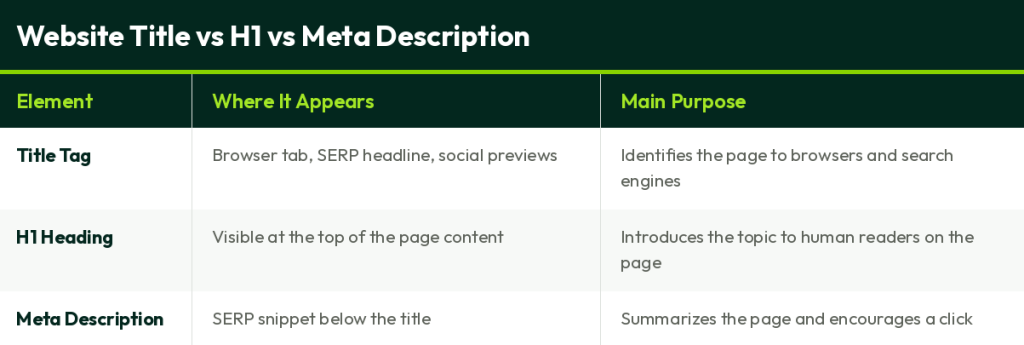
They can repeat similar keywords, and often should, but they’re not interchangeable. A page can have a strong H1 and still perform poorly in search if its title tag is vague or missing entirely.
Why Website Titles Matter for SEO
Title tags help search engines understand what a page is actually about, which plays into how that page gets matched to relevant queries. Beyond that structural role, a clear, relevant title directly influences click-through rate, since it’s usually the first thing a person reads on a results page.
A well-written title also shapes user experience before a visit even happens, setting an accurate expectation for what the page contains. That said, it’s worth being realistic about scope: a title tag is a meaningful ranking signal, but it’s one factor among many, not something that can compensate for weak content or a poor technical SEO foundation.
Examples of Website Titles
Different page types call for slightly different approaches to a title tag.
- Homepage: “Airbnb: Vacation Rentals, Cabins, Beach Houses, Unique Homes & Experiences” — states clearly what the business does, since a homepage title often serves as a brand’s main search snippet.
- Blog article: “How to Do SEO: Step-by-Step Guide” — descriptive and specific, matching what someone searching that exact topic would expect to find.
- Product page: “Wireless Noise-Cancelling Headphones — Model X200” — names the exact product, which matters more here than broad category terms.
- Category page: “Men’s Running Shoes | Shop the Full Collection” — broader than a product page, but still specific enough to signal relevance for category-level searches.
Each of these works because it matches the actual content and intent of its page type, not because it follows a rigid formula. A homepage title trying to do a blog post’s job, or vice versa, usually ends up vague in both directions.
Related Terms
- What Is a Headline: the on-page counterpart often confused with the title tag
- What Is Schema Markup: structured data that can influence how titles and other elements appear in rich results
- How to Do SEO: where title tags fit into a full on-page SEO process
Supporting Content
- Google Search Central: Title Link Best Practices: Google’s own documentation on how title tags are generated and displayed
- On-Page SEO Services: for optimizing title tags and other on-page elements at scale
- SEO Checklist: a practical resource covering titles and other on-page basics